
Guide · iPhone, iPad, Mac & Android
How to share a contact list with a team, club or class
Short answer
Put the members in one group, then in Contaxo tap Share Contacts, filter to that group and send the vCard file to your WhatsApp, Telegram or email group. Each person taps the file and adds everyone at once. For a list to print or pin up, export the same group to PDF, Word or Excel instead.


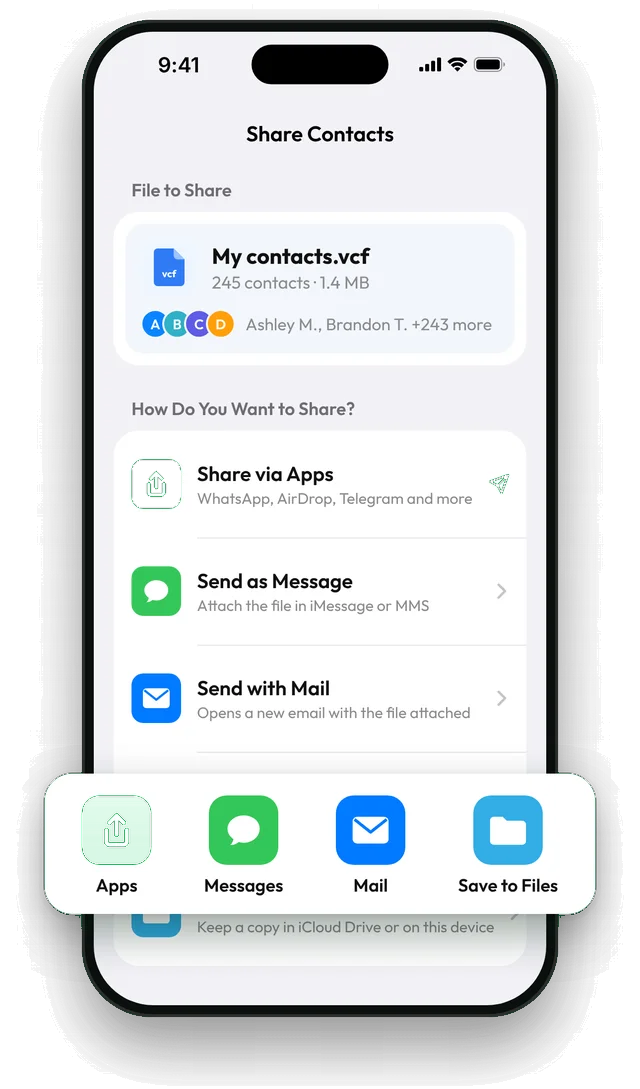
Share the list as one vCard file
Make a group
On iPhone, open Contacts › Lists › Add List, name it (for example Football team) and add the members.
Tap Share Contacts
In Contaxo, tap Share Contacts. You see the file, how many contacts it holds and its size.
Filter to the group
Tap Filter and pick the group, so only the members go into the file.
Send it to the group chat
Tap Share via Apps and choose WhatsApp, Telegram, Mail or Messages. Everyone who opens the file can add all members in one tap.
Which format should you send?
| The group wants | Send |
|---|---|
| Everyone’s numbers in their phone | A vCard from Share Contacts |
| A printed list for the notice board | A PDF with name and phone |
| A list they can edit (shifts, roles) | A Word or Excel file |
| A sign-up or mailing list | An Excel or CSV file with emails |
Keep it up to date
When someone joins or changes their number, update the contact and the group on your phone, then share a fresh file. Ask people to run their phone’s duplicate cleanup if they add the file twice; see Why duplicate contacts appear.
Without an app
- iPhone (iOS 17 or later): in Contacts › Lists, touch and hold your list and tap Export to share it as a vCard.
- Android: Google Contacts can export a label from contacts.google.com on a computer (Export › vCard).
Contaxo adds filters, the contact count and file size before you send, and the same list as PDF, Word or Excel.
Frequently asked questions
What do the others need?
Nothing special. On iPhone they tap the file and choose Add All Contacts. On Android the file opens in the Contacts app. They don't need Contaxo.
Should I include photos?
For a large group, turn off Include Photos in vCard in Contaxo's settings to keep the file small enough for every messaging app.
Should I share everyone's details?
Ask members first, and keep the file to what the group needs, usually name and phone number. Remove personal notes before sharing.
Is it free?
Sharing up to 100 contacts is free, which covers most teams and classes.
Related
- Export formatHow to export your contacts to a vCard (VCF) fileSend many contacts at once as one vCard (.vcf) file by WhatsApp, Mail, Messages, AirDrop or Quick Share. The person who gets it adds everyone in one tap.
- GuideHow to send multiple contacts at onceSend several contacts in one go from an iPhone or Android phone: as one vCard file by WhatsApp, Messages, Mail or AirDrop, so the other person adds them all in one tap.
- GuideHow to make a printed phone book for an elderly parentTurn the contacts on your phone into a clear, large-print phone list for a parent or grandparent: only the people who matter, only name and number, ready to print or edit.
- Export formatHow to export your contacts to WordTurn your phone contacts into an editable Word (.docx) table for a phone list, directory or handout. Preview every page, choose columns and filter.
Your contacts, in any file you need.
Free to download for iPhone, iPad, Mac and Android. No account, and we never see your contacts.