
Feature · iPhone, iPad, Mac & Android
How to back up and restore your contacts
Short answer
In Contaxo, tap Back Up Now to save every contact as a vCard file. On iPhone and iPad it goes to your own iCloud Drive; on Android it is saved on the phone, with a copy to Google Drive in one tap. To get contacts back, tap Restore: only the missing contacts are added, so nothing is duplicated. Backups and restores are free.


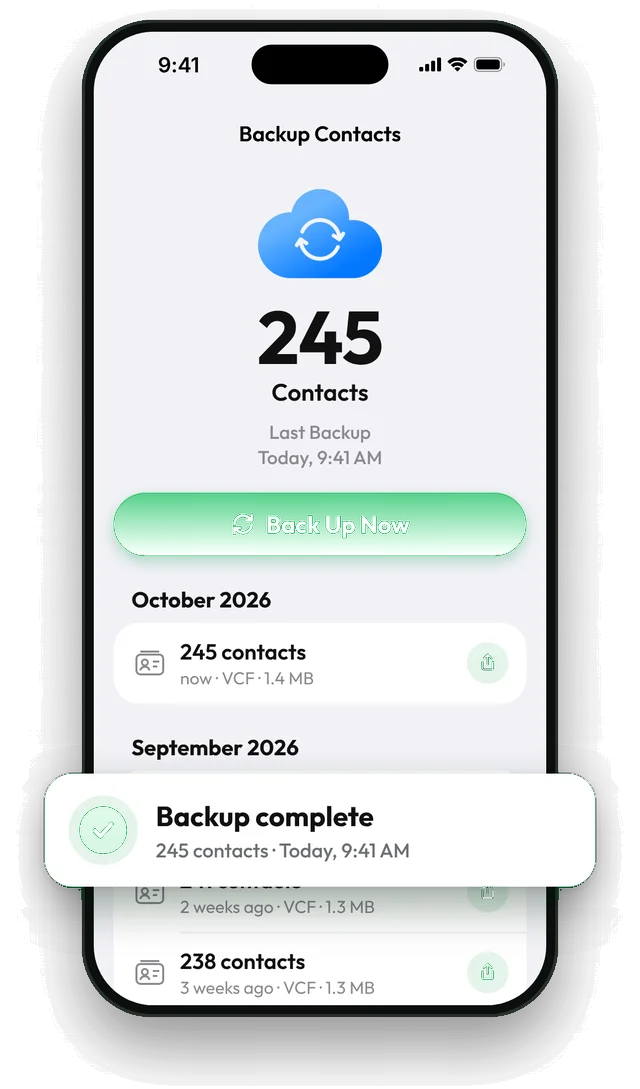
Step by step with Contaxo
Open Backup Contacts
In Contaxo, tap the backup card at the top of the Home tab. It shows how many contacts you have, when you last backed up and how many changed since.
Tap Back Up Now
Contaxo saves a vCard of every contact. On iPhone and iPad the file goes to the app's folder in your iCloud Drive, so it stays there even if you delete the app and is waiting on your next iPhone.
Keep a copy somewhere else (optional)
Tap Share backup to save a copy to Google Drive, Files or Mail. On Android this is how you keep a copy off the phone. Your first share is free.
Turn on reminders
In Settings › Backup Settings, turn on backup reminders and choose every week, every two weeks or every month. Turn on Remind Only If Backup Is Out of Date to be reminded only when contacts changed.
Restore when you need to
Swipe a backup in the list and tap Restore. Contaxo adds the contacts that are missing from your address book and leaves the others untouched.
Where your backups are kept
| Feature | iPhone and iPad | Android |
|---|---|---|
| Backup file | vCard (.vcf) of every contact | vCard (.vcf) of every contact |
| Saved to | Your iCloud Drive (or the device, if iCloud Drive is off) | Your phone |
| Copy elsewhere | Share backup to Drive, Mail or AirDrop | Share backup to Google Drive or Files |
| Automatic | Shortcuts automation | Home-screen shortcut for one-tap backup |
| Reminders | Weekly, every 2 weeks, monthly, or only when contacts changed | Same |
Backups are never sent to our servers. Because they are standard vCard files, you can also open them in any other contacts app, so you are never locked in.
The built-in way (without an app)
- iPhone: contacts sync with iCloud when Settings › your name › iCloud › Contacts is on. iCloud.com keeps a limited history of your contacts (under Data Recovery) that you can restore, which replaces your current contacts.
- Android: contacts saved to your Google account sync automatically, and Google Contacts can undo changes from the last 30 days.
These are good safety nets. Contaxo adds files you control, restores that only add what is missing, and reminders.
Frequently asked questions
Isn't iCloud or Google sync already a backup?
Sync keeps your devices the same, so if a contact is deleted or overwritten, the change syncs everywhere. A backup file is a copy from a point in time that you can go back to.
Will restoring create duplicates?
No. Contaxo checks which people are already in your address book and adds only the contacts that are missing.
Can backups run automatically?
On iPhone and iPad, add the Back Up Contacts action to an automation in the Shortcuts app (for example every Sunday at 9:00) and it runs without opening the app. On Android, add the Back Up Contacts shortcut to your home screen to back up with one tap.
How do I know my backup is out of date?
The Home tab shows when you last backed up and how many contacts were added or changed since.
Are contact photos backed up?
Yes, by default. You can turn off Include Photos in vCard in Settings › Backup Settings to make backups smaller.
Is it really free?
Yes. Backing up every contact and restoring are free with no limit. Pro adds unlimited sharing of backup files; your first share is free.
Related
- FeatureHow to move your contacts to a new phoneMove every contact from your old phone to a new one with a QR code: iPhone to Android, Android to iPhone or same to same. End-to-end encrypted, no accounts, no duplicates.
- FeatureHow to find and merge duplicate contactsFind duplicate contacts by name, phone number or email, then delete the copies or merge them into one contact, with a restore point and undo.
- Export formatHow to export your contacts to a vCard (VCF) fileSend many contacts at once as one vCard (.vcf) file by WhatsApp, Mail, Messages, AirDrop or Quick Share. The person who gets it adds everyone in one tap.
Your contacts, in any file you need.
Free to download for iPhone, iPad, Mac and Android. No account, and we never see your contacts.