
Guide · iPhone, iPad, Mac & Android
Why do duplicate contacts appear, and how do you stop them?
Short answer
Most duplicates come from the same people saved in two places: two synced accounts (for example iCloud and Google), a vCard or SIM card imported twice, or contacts copied again when you switched phones. Find out where the copies live, turn off the extra source or keep one account, then merge or delete the copies with Contaxo Duplicates or your phone's built-in tool.


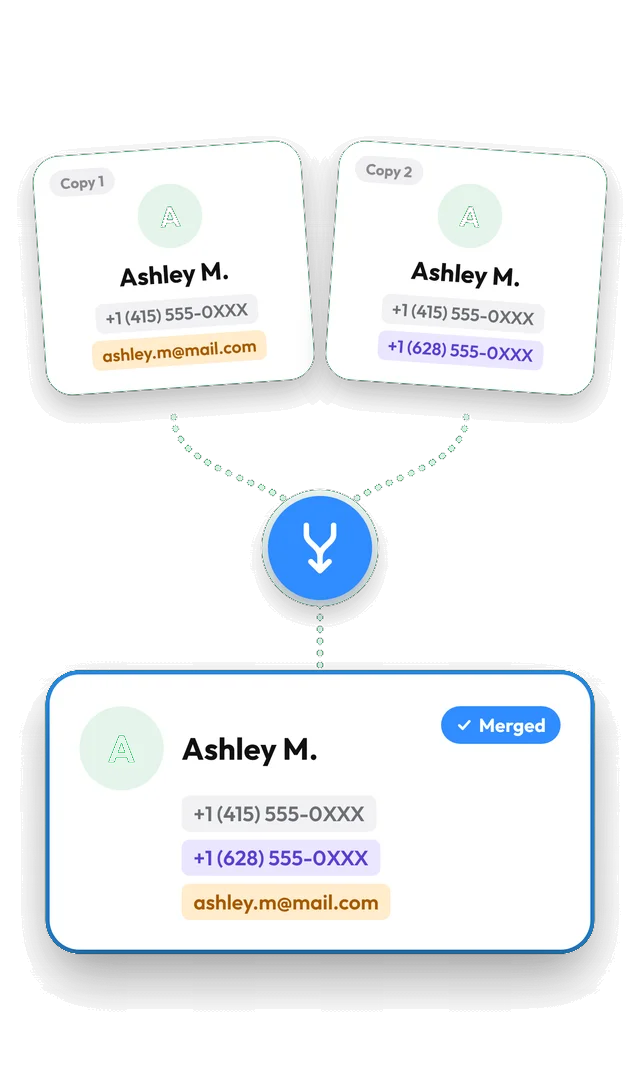
Clean up duplicates with Contaxo
Back up first
In Contaxo, tap Back Up Now. Backing up is free and gives you a copy to go back to.
Open Duplicates
Tap Duplicates. Contacts that share a name, phone number or email are grouped, with the reason shown for each group.
Choose the rules
Tap Matching Rules to decide what counts as a duplicate, and leave out unnamed or company contacts if you want.
Merge or delete
Merge each group into one contact that keeps every number and email (Pro), or delete the extra copies for free. Tap Undo right after if something looks wrong.
The usual causes
| Cause | How it happens | Fix |
|---|---|---|
| Two synced accounts | The same people are in iCloud and Google (or Outlook, or a Samsung account), and the phone shows both. | Keep contacts in one account; turn off contacts for the other. |
| A file imported twice | A vCard or CSV was opened again, or Add All Contacts was tapped on a backup. | Merge or delete the copies. Next time use a restore that adds only missing contacts. |
| SIM card import | Contacts were copied from the SIM to a phone that already had them. | Merge, and don’t import the SIM again. |
| Switching phones | Contacts were copied over and then also synced from an account. | Merge once; pick one way to move contacts next time. |
| Messaging and work apps | Apps such as email or work accounts add their own contact entries. | Turn off contacts sync in that app’s account settings. |
Find where the copies live
- iPhone: in Contacts, tap Lists to see each account (iCloud, Gmail, Outlook, On My iPhone) and how many contacts it holds. Accounts are managed in Settings › Apps › Contacts › Contacts Accounts (older iOS: Settings › Contacts › Accounts).
- Android: in Google Contacts, tap your profile picture to see which account is shown. On Samsung phones, the Contacts app’s settings show the default storage location for new contacts (phone, Samsung account or Google).
If the same person appears once in each account, the cause is two synced accounts. If the copies are all in one account, they came from an import.
Stop it from coming back
- Choose one home for your contacts, usually iCloud on iPhone or Google on Android, and set it as the default account.
- Restore without adding everyone again. Contaxo’s restore adds only missing contacts; Contaxo’s transfer to a new phone skips people who are already there.
- Check imports before saving. Contaxo’s import shows every contact with a tick, so you can leave out people you already have.
Built-in tools
- iPhone and iPad (iOS 16 or later): when Contacts finds duplicates, a Duplicates Found card appears at the top of the list. Tap View Duplicates to merge.
- Android: Google Contacts suggests merges under Fix & manage › Merge & fix; Samsung has Manage contacts › Merge contacts.
See Find and merge duplicate contacts for what Contaxo adds: your own matching rules, the choice between merging and deleting, and restore points.
Frequently asked questions
I deleted the duplicates and they came back. Why?
The copies are still in an account that syncs to your phone, so they are downloaded again. Find the account that holds them (see the table below) and clean up there, or turn off contact sync for an account you don't need.
Does turning off an account's contacts delete them?
It removes that account's contacts from the phone, but they stay in the account online (for example on contacts.google.com). Back up first if you are unsure which account holds what.
Why does my iPhone show one contact, but my Android or Google shows two?
iPhone can link cards from different accounts and show them as one contact. In each account they are still separate. Clean up in the account itself, or keep your contacts in one account only.
Will restoring a backup create duplicates?
Not with Contaxo: a restore adds only the contacts that are missing. Opening a vCard backup on iPhone with Add All Contacts adds everyone again, which is a common cause of duplicates.
Related
- FeatureHow to find and merge duplicate contactsFind duplicate contacts by name, phone number or email, then delete the copies or merge them into one contact, with a restore point and undo.
- FeatureHow to back up and restore your contactsBack up every contact on your iPhone, iPad or Android phone in one tap, get reminders when the backup is out of date, and restore only what is missing.
- FeatureHow to import contacts from Excel, CSV or vCardAdd contacts to your iPhone, iPad or Android phone from an Excel, CSV or vCard file. Columns are matched for you and you choose who to add.
- FeatureHow to move your contacts to a new phoneMove every contact from your old phone to a new one with a QR code: iPhone to Android, Android to iPhone or same to same. End-to-end encrypted, no accounts, no duplicates.
Your contacts, in any file you need.
Free to download for iPhone, iPad, Mac and Android. No account, and we never see your contacts.