
Guide · iPhone, iPad, Mac & Android
How to send multiple contacts at once
Short answer
Put all the contacts in one vCard file and send that. In Contaxo, tap Share Contacts, filter to the people you want (a group, or contacts with a phone, email or company) and send the file by WhatsApp, Messages, Mail, AirDrop or Quick Share. The other person taps it and adds everyone at once.


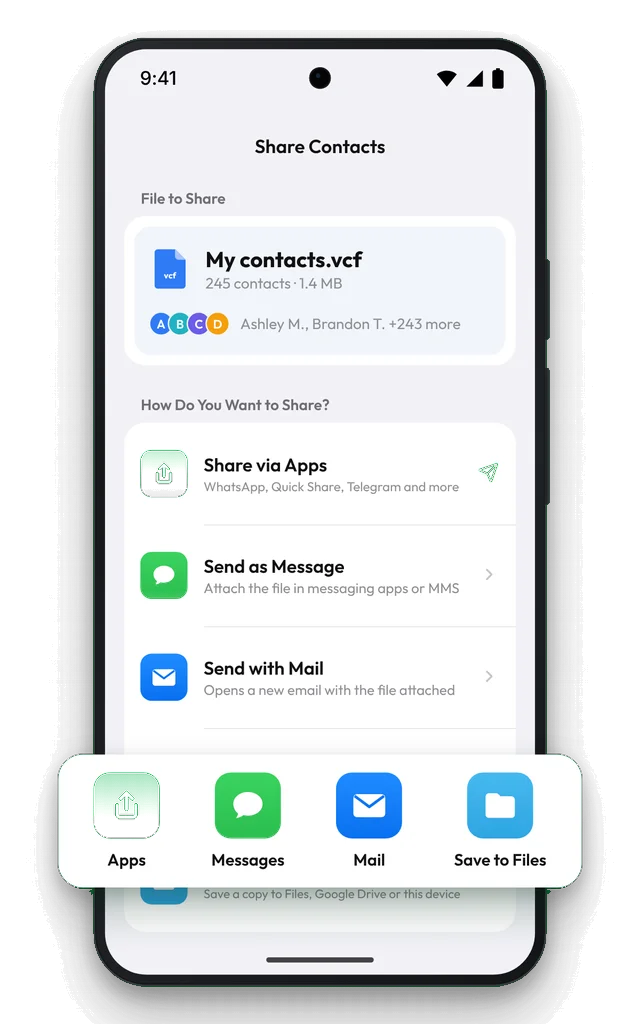
Send many contacts as one file with Contaxo
Tap Share Contacts
On the Home tab of Contaxo, tap Share Contacts. You see the file name, how many contacts it holds and its size.
Choose who is included
Tap Filter to send one group, or only contacts with a phone number, an email or a company.
Pick the app
Tap Share via Apps for WhatsApp, Telegram, AirDrop or Quick Share, or send it with Messages, Mail or Gmail.
The other person adds them
On iPhone, tapping the file shows Add All Contacts. On Android, it opens in the Contacts app.
Ways to send several contacts
| Method | How many | Works with |
|---|---|---|
| Contaxo Share Contacts | Any group or filter | Any app, any phone |
| iPhone Share Contact | One at a time | Any app |
| iPhone Lists › Export (iOS 17+) | A whole list | Any app |
| Android Contacts Share | Selected contacts, as a .vcf | Any app |
| WhatsApp Contact attachment | Contacts you pick in the chat | WhatsApp only |
Moving all your contacts to a new phone?
Sending a file works, but Transfer to New Phone is made for it: scan a QR code, confirm, and only the people missing on the new phone are added.
Frequently asked questions
Can I send multiple contacts from the iPhone Contacts app?
One contact at a time with Share Contact. On iOS 17 or later you can also export a whole list: in Contacts › Lists, touch and hold the list and tap Export.
Can WhatsApp send several contacts?
In a chat, the attachment menu's Contact option lets you pick contacts to send. For a long list, a single vCard file is quicker for both of you, and the other person can add everyone at once.
Will the other person need an app?
No. vCard is the standard contact file; iPhone, Android, Mac, Outlook and Gmail all open it.
The file is too large to send
Contact photos make vCards big. Turn off Include Photos in vCard in Contaxo's settings and share again.
Is it free?
Sharing up to 100 contacts is free. Pro shares any number. To send all your contacts to yourself, Back Up Now is free and so is your first share of a backup.
Related
- Export formatHow to export your contacts to a vCard (VCF) fileSend many contacts at once as one vCard (.vcf) file by WhatsApp, Mail, Messages, AirDrop or Quick Share. The person who gets it adds everyone in one tap.
- GuideHow to share a contact list with a team, club or classGive everyone in a team, club, class or building the same contact list: one vCard file they add in one tap, or a printable PDF or Excel list. Works from iPhone and Android.
- GuideWhat is a VCF (vCard) file?A VCF or vCard file is the standard file format for contacts. What it contains, how to open it on iPhone, Android, Mac and Windows, and how to make one.
- FeatureHow to move your contacts to a new phoneMove every contact from your old phone to a new one with a QR code: iPhone to Android, Android to iPhone or same to same. End-to-end encrypted, no accounts, no duplicates.
Your contacts, in any file you need.
Free to download for iPhone, iPad, Mac and Android. No account, and we never see your contacts.