
Export format · iPhone, iPad, Mac & Android
How to export your contacts to a vCard (VCF) file
Short answer
A vCard (.vcf) file holds many contacts in one file that any phone or address book can import. In Contaxo, tap Share Contacts, filter the list if you want, and send the file by WhatsApp, Mail, Messages, AirDrop or Quick Share. The person who gets it can add everyone in one tap.


Step by step with Contaxo
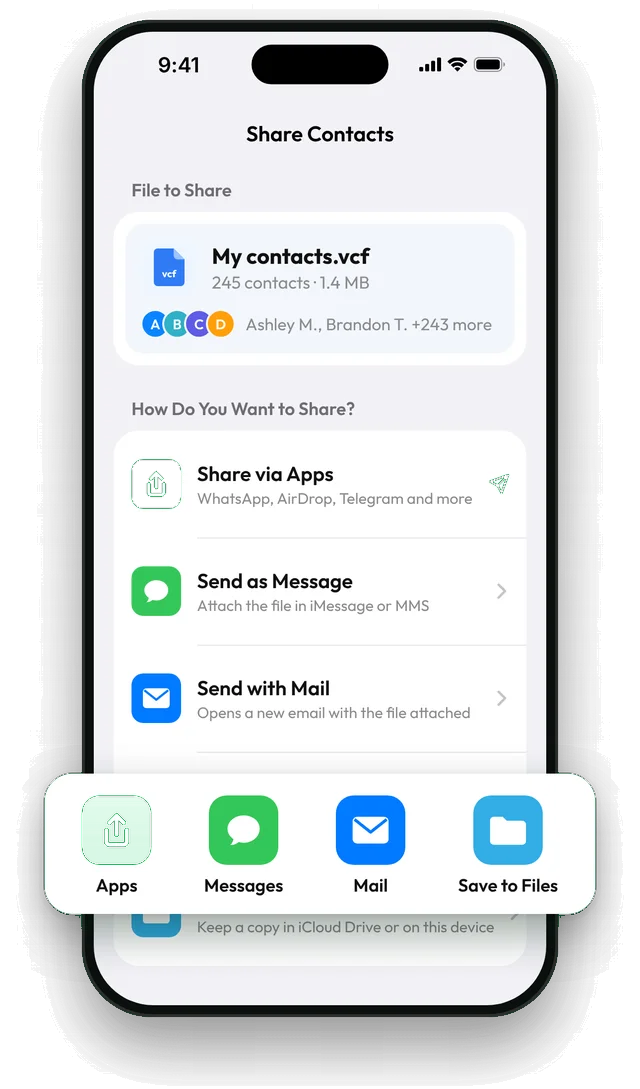
Tap Share Contacts
On the Home tab of Contaxo, tap Share Contacts. You see the file name, how many contacts it holds and its size.
Filter who is included
Tap Filter to share one group, or only contacts with a phone number, an email or a company.
Choose how to send it
Tap Share via Apps for WhatsApp, Telegram, AirDrop or Quick Share, or send it with Messages, Mail or Gmail. You can also save it to Files or Google Drive.
The other person adds them
On iPhone, tapping the file shows Add All Contacts. On Android, the file opens in the Contacts app (or in Contaxo) to import.
The built-in way (without an app)
- iPhone (iOS 17 or later): in Contacts, tap Lists, touch and hold a list such as All Contacts, tap Export, choose the fields and send or save the file. You can export a whole list, but you cannot filter by phone, email or company.
- Android: in the Contacts app, use Fix & manage › Export to file (Google Contacts) or Manage contacts › Import or export contacts › Export (Samsung). This saves every contact of an account to a .vcf file.
- iCloud.com: select contacts and choose Export vCard.
Contaxo adds filters, a size and contact count before you send, and one-tap sending to the app you choose.
Frequently asked questions
What is a VCF file?
VCF (vCard) is the standard file format for contacts. One file can hold one contact or thousands, with names, numbers, emails, addresses and photos. iPhone, Android, Outlook, Gmail and most CRMs can import it.
Are contact photos included?
Yes, by default. You can turn off Include Photos in vCard in Contaxo's settings to make the file smaller.
Can I send a vCard of all my contacts for free?
Sharing is free for up to 100 contacts. To keep a vCard of everyone for yourself, use Back Up Now, which is free for all your contacts, and your first share of a backup file is free too.
Related
- FeatureHow to move your contacts to a new phoneMove every contact from your old phone to a new one with a QR code: iPhone to Android, Android to iPhone or same to same. End-to-end encrypted, no accounts, no duplicates.
- FeatureHow to back up and restore your contactsBack up every contact on your iPhone, iPad or Android phone in one tap, get reminders when the backup is out of date, and restore only what is missing.
- FeatureHow to import contacts from Excel, CSV or vCardAdd contacts to your iPhone, iPad or Android phone from an Excel, CSV or vCard file. Columns are matched for you and you choose who to add.
Your contacts, in any file you need.
Free to download for iPhone, iPad, Mac and Android. No account, and we never see your contacts.