
Guide · iPhone, iPad, Mac & Android
How to restore deleted contacts on iPhone and Android
Short answer
Where you can recover them depends on where the contacts were saved. iCloud contacts: restore an earlier version at icloud.com/contacts › Data Recovery. Google contacts: open the Trash or use Undo changes, both within 30 days. Contacts saved only on the phone come back only from a backup, such as a Contaxo backup file, whose restore adds just the missing contacts.


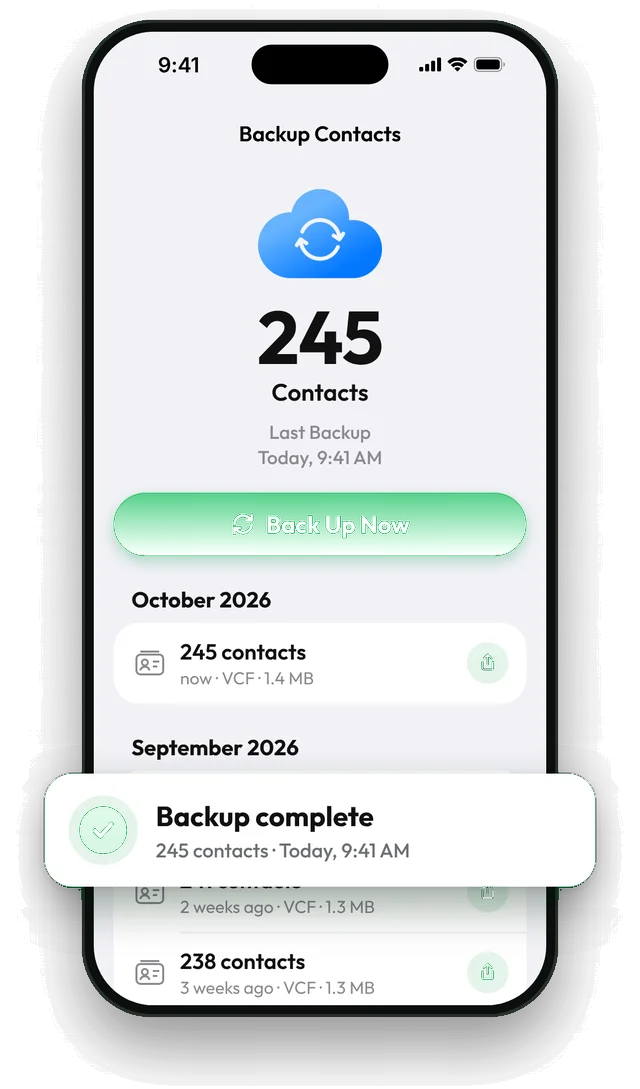
Restore from a Contaxo backup
Open Backup Contacts
In Contaxo, tap the backup card at the top of the Home tab to see your list of backups.
Pick a backup from before the deletion
Find the most recent backup made before the contacts went missing.
Swipe and tap Restore
Swipe the backup and tap Restore. Contaxo adds only the contacts that are missing from your address book and leaves the others untouched.
Check
Open your contacts and search for a few of the people you lost.
First: where were the contacts saved?
- iPhone: in Contacts, tap Lists. If you see iCloud, your contacts sync with iCloud. Gmail or Google means Google. On My iPhone means only on the phone.
- Android: most contacts are in your Google account. Samsung phones may also save to the phone or a Samsung account.
iCloud contacts: Data Recovery
- On a computer, go to icloud.com/contacts and sign in.
- Open Data Recovery and choose Restore Contacts.
- Pick a version from before the deletion and click Restore.
The version you pick replaces your contacts on all your devices. Contacts you added after that date disappear, so back up or export your current contacts first.
Google contacts: Trash or Undo changes
- A few contacts: on contacts.google.com (or in the Google Contacts app), open Trash, select the contacts and click Recover. Deleted contacts stay in the Trash for 30 days.
- Many contacts or a bad cleanup: in Google Contacts, open Settings › Undo changes, choose a time up to 30 days ago and confirm. This rolls back your whole list.
Samsung contacts
Samsung’s Contacts app has its own Trash in the menu, for contacts saved on the phone or in a Samsung account. Open it, select the contacts and tap Restore.
Next time: keep your own backup
Sync isn’t a backup: when a contact is deleted, the deletion syncs to every device. A backup file is a copy from a point in time. With Contaxo, Back Up Now saves every contact for free, and you can set it to run every week. See Back up and restore contacts.
Frequently asked questions
How far back can I restore iCloud contacts?
iCloud keeps a limited number of automatic archives, listed by date under Data Recovery. A recent deletion can take up to 24 hours to show up as an archive.
Does restoring from iCloud undo my newer changes?
Yes. The version you choose replaces your current contacts on every device. iCloud saves your current contacts first, so you can undo the restore.
Can I get back Google contacts deleted more than 30 days ago?
Not from Google: the Trash and Undo changes both stop at 30 days, and contacts deleted forever from the Trash can't be recovered. A backup file you kept is the only way.
My contacts were only on the phone, not in iCloud or Google
Then only a backup can bring them back: a Contaxo backup file, or a full phone backup (restoring that replaces everything on the phone). Start backing up now so it doesn't happen again.
Are backups and restores free in Contaxo?
Yes. Backing up every contact and restoring are free with no limit.
Related
- FeatureHow to back up and restore your contactsBack up every contact on your iPhone, iPad or Android phone in one tap, get reminders when the backup is out of date, and restore only what is missing.
- GuideHow to back up your iPhone contacts without iCloudKeep a copy of your iPhone contacts that doesn't depend on iCloud: a vCard file in Files, Google Drive, email or on your computer. Built-in way and the Contaxo way.
- GuideHow to back up your iPhone contacts automaticallySet up a weekly contacts backup on iPhone or iPad with a Shortcuts automation and Contaxo. It runs on its own, with no need to open the app. Plus one-tap backups on Android.
- FeatureHow to find and merge duplicate contactsFind duplicate contacts by name, phone number or email, then delete the copies or merge them into one contact, with a restore point and undo.
Your contacts, in any file you need.
Free to download for iPhone, iPad, Mac and Android. No account, and we never see your contacts.