
Guide · Android
How to export Samsung contacts to Excel
Short answer
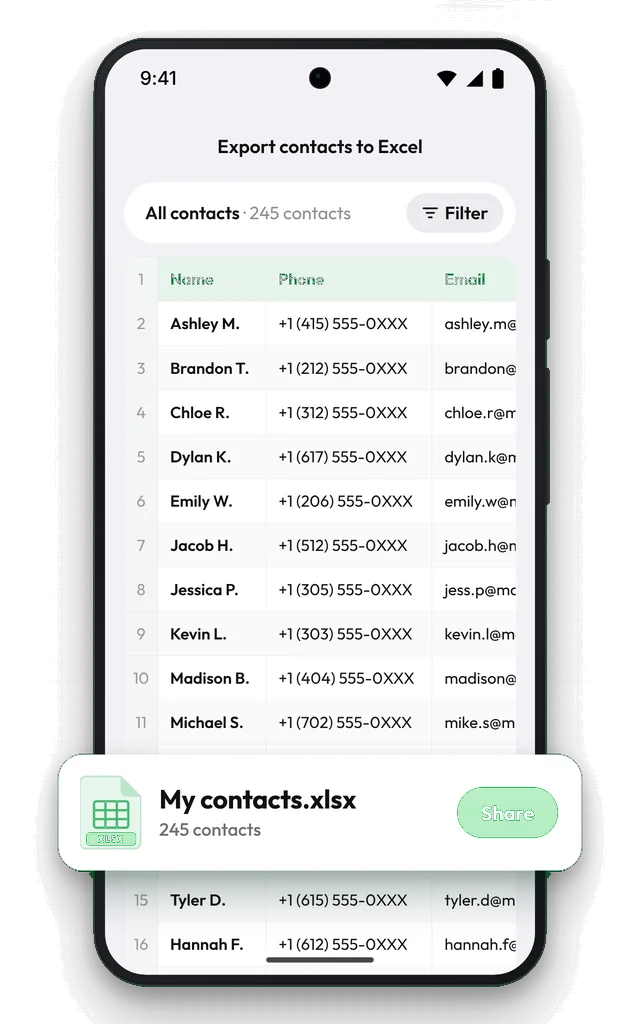
Samsung's Contacts app can export only a vCard (.vcf) file, which Excel doesn't show as a table. To get a real Excel (.xlsx) file on the phone, open Contaxo, tap Excel, choose the columns and tap Export. If your contacts sync with Google, you can also export a CSV from contacts.google.com on a computer.

Export Samsung contacts to Excel with Contaxo
Install Contaxo and allow access
Get Contaxo from Google Play and allow access to your contacts. It reads the contacts your Samsung Contacts app shows, whether they are saved on the phone, in your Samsung account or in Google.
Tap Excel
On the Home tab, tap Excel. The spreadsheet appears right away, one row per contact.
Choose columns and filter
Pick the fields you need (name, phone, email, company, address, birthday and more). Use the filter to keep only contacts with a phone number or an email, or one group.
Export
Tap Export and save the .xlsx file to Google Drive or Files, or send it by Gmail, WhatsApp or Quick Share.
The built-in way
Samsung Contacts (VCF only):
- Open Contacts and tap the menu.
- Tap Manage contacts, then Import or export contacts.
- Tap Export, choose a storage location and confirm.
Google Contacts on a computer (CSV): if your contacts are saved in your Google account, open contacts.google.com, choose Export and pick Google CSV or Outlook CSV. Contacts saved only on the phone or in your Samsung account are not included.
| Feature | Samsung Contacts | Google Contacts (web) | Contaxo |
|---|---|---|---|
| File type | VCF only | CSV or VCF | Excel, CSV, PDF, Word, VCF |
| On the phone | Yes | No, needs a computer | Yes |
| Includes phone and Samsung-account contacts | Yes | No, Google contacts only | Yes |
| Choose columns | No | No | Yes |
| Preview before saving | No | No | Yes |
After you export
- Bring an edited spreadsheet back into the phone with Import.
- Make a printable list with PDF export.
- Keep a full copy with Backup.
Microsoft Excel is a trademark of Microsoft Corporation. Samsung and Galaxy are trademarks of Samsung Electronics. Contaxo is not affiliated with either company.
Frequently asked questions
Where is the export option in Samsung Contacts?
Open Contacts, tap the menu, then Manage contacts › Import or export contacts › Export, and choose where to save. The result is a .vcf file, not a spreadsheet.
Can I open the Samsung VCF file in Excel?
Excel shows a vCard as lines of text, not a table with columns. Use Contaxo's Excel export, or import the VCF into Google Contacts and export a CSV.
Does this work on Galaxy tablets and foldables?
Yes. On tablets and unfolded foldables Contaxo shows a sidebar with every tool one tap away.
Will my contacts be uploaded?
No. The Excel file is created on your phone, and we never receive your contacts. The file only leaves the phone when you save or share it.
Related
- Export formatHow to export your contacts to ExcelTurn your iPhone, iPad or Android contacts into a real Excel (.xlsx) spreadsheet in a few taps, with a preview, column picker and filters. No computer needed.
- Export formatHow to export your contacts to a CSV fileSave your iPhone, iPad or Android contacts as a UTF-8 CSV file for Google Sheets, CRMs, mailing tools and mail merge. Pick columns and filter first.
- PlatformContaxo for AndroidExport Android contacts to Excel, PDF, CSV, Word and vCard, back them up with a copy to Google Drive, move them to a new phone with a QR code and merge duplicates.
- FeatureHow to back up and restore your contactsBack up every contact on your iPhone, iPad or Android phone in one tap, get reminders when the backup is out of date, and restore only what is missing.
Your contacts, in any file you need.
Free to download for iPhone, iPad, Mac and Android. No account, and we never see your contacts.