
Guide · Android
How to import a CSV or Excel file into Android contacts
Short answer
The Contacts app on Android imports only .vcf files. To add contacts from a CSV or Excel file on the phone, open Contaxo, tap Import Contacts, choose the file, check the matched columns and tap Save. On a computer, you can instead import the CSV at contacts.google.com; the contacts then sync to any Android phone with that Google account.

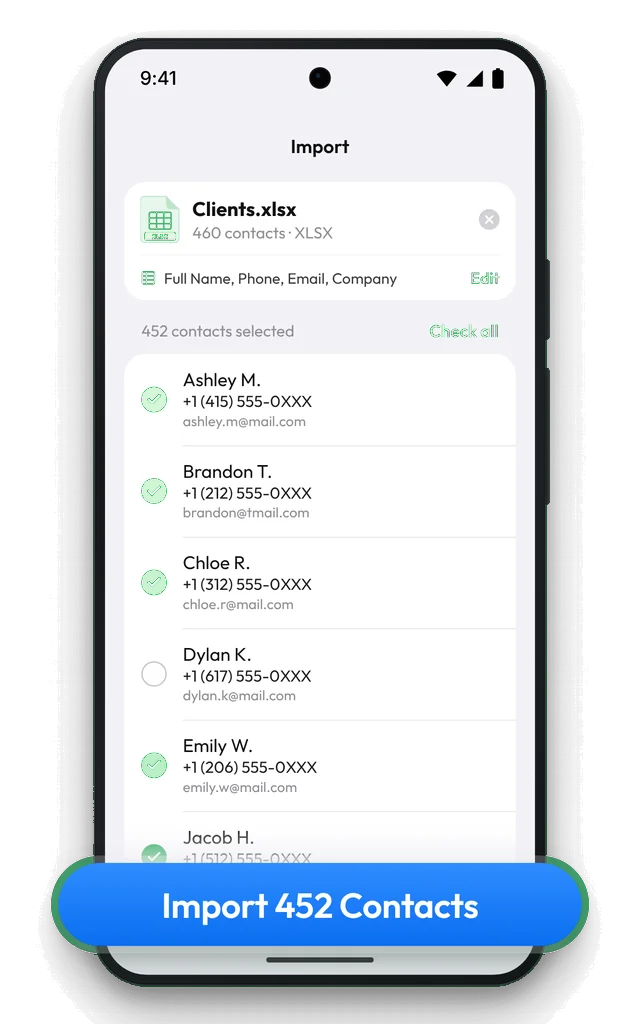
Import a CSV or Excel file on Android with Contaxo
Choose the file
In Contaxo, tap Import Contacts, then Choose a file, and pick the .csv, .xlsx or .xls file from Downloads or Google Drive.
Check the columns
Contaxo reads the header row and matches each column to a field such as name, phone, email or company. Tap Edit to change a column.
Pick the contacts
Every row becomes a contact with a tick. Untick anyone you don't need.
Save
Tap Save to add them to your phone's contacts.
On a computer: Google Contacts
- Open contacts.google.com and sign in with the Google account used on your phone.
- Click Import, choose the CSV file and click Import. Google adds a label with the date so you can find the new contacts.
- On the phone, the contacts appear after the next sync.
For an Excel file, save it as CSV UTF-8 in Excel first. If the CSV has different column names from Google’s, some fields may land in notes or be skipped; check a few contacts afterwards.
Samsung phones
Samsung Contacts imports vCards from Manage contacts › Import or export contacts › Import. For CSV and Excel files, use Contaxo, or Google Contacts on a computer if your contacts are saved in your Google account.
Which way should I use?
| You want | Use |
|---|---|
| To do it on the phone | Contaxo |
| To choose who gets added and fix columns first | Contaxo |
| A free way, with a computer and a Google account | contacts.google.com import |
Frequently asked questions
Can Google Contacts on the phone import a CSV?
No. The Google Contacts app and Samsung Contacts import .vcf files only. CSV import is available on contacts.google.com from a computer.
My file is a vCard, not a CSV
Open it with the Contacts app, or in Google Contacts use Fix & manage › Import from file. Contaxo can import vCards too.
Phone numbers lost their leading 0
That happened in Excel before the file was saved. Format the phone column as Text in Excel, fix the numbers and save again.
Is it free?
Files with up to 5 contacts are free. Larger files need Pro; Contaxo tells you before you tap Save.
Related
- FeatureHow to import contacts from Excel, CSV or vCardAdd contacts to your iPhone, iPad or Android phone from an Excel, CSV or vCard file. Columns are matched for you and you choose who to add.
- PlatformContaxo for AndroidExport Android contacts to Excel, PDF, CSV, Word and vCard, back them up with a copy to Google Drive, move them to a new phone with a QR code and merge duplicates.
- GuideHow to fix broken characters in a contacts CSV fileNames with accents, Turkish, Arabic, Chinese or Cyrillic letters turn into é, ı or ??? when a contacts CSV is opened in Excel or imported. Why it happens and how to fix it.
- FeatureHow to find and merge duplicate contactsFind duplicate contacts by name, phone number or email, then delete the copies or merge them into one contact, with a restore point and undo.
Your contacts, in any file you need.
Free to download for iPhone, iPad, Mac and Android. No account, and we never see your contacts.